Ajuga Font Review: A Gothic Masterpiece for Creative Projects
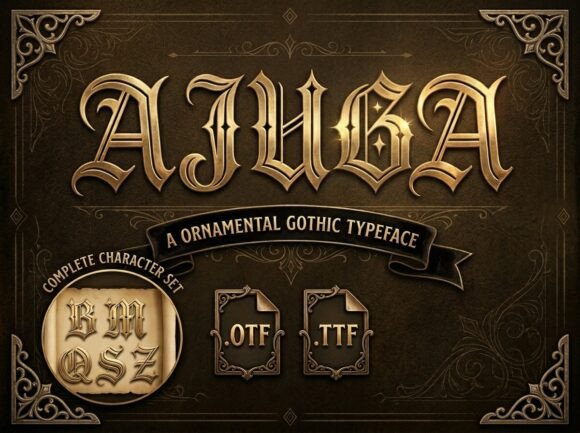
As a web designer who often works with handmade sellers and printable creators, I’m always on the lookout for fonts that bring character to a brand or product. Recently, I had the chance to test Ajuga, an ornamental Gothic typeface, across a range of design scenarios—from digital shop listings to printed materials. What stood out was how this font doesn’t just look beautiful but also feels like it carries a story. If you’re someone who values visual impact and wants to elevate your creative projects with a touch of medieval majesty, let me share my hands-on experience with Ajuga as a display font.
Ajuga for Candle Labels and Handmade Packaging
I started by using Ajuga on candle labels for a client’s apothecary-style home goods line. The font is a masterclass in Blackletter design, featuring sharp, dramatic strokes that evoke a sense of timeless elegance. When paired with natural textures like kraft paper or linen wraps, Ajuga transformed the packaging into something that felt handcrafted yet professional. It added a level of sophistication that made the products stand out in both online listings and in-person displays.
However, because it’s a decorative display font, I found it best suited for short names or taglines rather than long ingredient lists or descriptions. Its ornate nature makes it less practical for dense text, so I recommended keeping key information concise and using it only where emphasis was needed. This approach helped maintain readability while still giving the brand its signature style.
Ajuga in Greeting Cards and Seasonal Printables
Next, I tested Ajuga on holiday greeting cards and seasonal printables. The results were stunning—especially when used for headers or special phrases like “Merry Christmas” or “Happy New Year.” The font has a commanding presence that adds drama without overwhelming the layout. For these types of cards, I layered Ajuga over watercolor illustrations and soft pastel backgrounds, which balanced the strong contrast of the Blackletter style perfectly.
One thing I noticed was that the font works exceptionally well in SVG format for cutting machines like Cricut or Silhouette. The clean lines and defined serifs translate beautifully onto vinyl, wood, or even laser-cut materials. Just be mindful of the size; smaller cuts may lose some of their detail unless they're high resolution. For card titles, I found 36–48pt worked best to ensure clarity and visual weight.
Ajuga for Wedding Invitations and Event Stationery
Wedding invitations are one of those rare spaces where a bold, elegant font can truly shine—and Ajuga did not disappoint. I used it for the main title of a set of rustic-themed wedding invites. The sharp, dramati curves gave a regal feel that complemented calligraphy accents and vintage illustrations. It wasn’t too heavy for the eye, but it definitely commanded attention and wonder, making it perfect for creating that “breathtaking” first impression the font description promises.
For event stationery, I paired Ajuga with a simple serif font for body text. This combination allowed the Gothic elements to pop while ensuring the rest of the content remained legible. I also recommend checking if the font includes ligatures or alternate characters—those little flourishes really add charm to formal designs.
Ajuga in Boutique Branding and Shop Listings
I’ve been helping a small artisanal boutique refine its brand identity, and Ajuga fit right in with their aesthetic. They sell hand-dyed fabrics and vintage-inspired accessories, and the font added just the right amount of gravitas to their logo and packaging. As a display font, it worked great on signage and tags, especially when rendered in metallic ink or embossed finishes. The overall effect was like stepping into a realm of medieval majesty, exactly what the brand wanted to convey.
When using Ajuga for shop listings, I included it in mockup previews to give customers a clear sense of the product’s style. On tote bags and mugs, it looked fantastic when outlined or filled with solid color. But again, I avoided using it for lengthy paragraphs or instructions—it’s more of a showstopper than a workhorse. Make sure you have commercial font licensing sorted if you plan to use it in any physical product or digital template sales.
Ajuga for Farmhouse Signs and Wall Art
Farmhouse signs and wall art are big in the handmade community, and Ajuga delivered the kind of personality that makes such pieces memorable. I created a few sample designs with quotes like “Welcome Home” and “Family First,” and the font’s dramatic flair made each phrase feel like a statement. It’s particularly effective when used sparingly—think about placing it at the top of a sign or behind a central image to create depth.
The font’s ornamental style plays well with distressed textures and warm tones. I also experimented with light tracing effects in Photoshop to highlight the letterforms against a weathered background. The result was a piece that felt both classic and modern, proving that Ajuga isn’t just for historical themes. It can be adapted to suit a variety of aesthetics while staying true to its Gothic roots.
Ajuga in Planner Pages and Editorial Design
Planner pages and editorial spreads are another area where Ajuga can make a subtle but powerful impact. I used it for chapter headings and decorative titles in a planner mockup. The contrast between the intricate Blackletter design and the minimalist sans serif body text was striking. It helped break up content visually and guided the reader’s eye toward important sections.
What I appreciated most was how Ajuga could be styled differently within the same project. By adjusting stroke width, adding shadows, or changing colors, I was able to keep the design fresh and engaging across multiple layouts. It’s a premium font that offers enough variation to justify its place in a professional toolkit.
Font Pairing Suggestions with Ajuga
While Ajuga is undeniably bold, it pairs surprisingly well with a variety of other fonts. For a clean balance, try combining it with a modern sans serif like Montserrat or Lato for body copy. If you want to lean further into the ornate vibe, a complementary script or handwritten font like Great Vibes or Allura can add a romantic flourish. Just remember to use Ajuga as an accent, not a full-text solution.
On the other hand, if you’re going for a bolder look, pair it with another display font—something with contrasting weights or styles. This can create a dynamic visual hierarchy in branding materials or shop banners. Always preview the pairing in real context before finalizing, especially if you're selling digital downloads or templates.
Readability Tips and Best Practices
Because Ajuga is highly decorative, it’s essential to consider where and how you use it. It thrives in larger sizes and on high-contrast backgrounds. Avoid using it in tiny cuts or low-resolution images, as the fine details might get lost. I also suggest testing it in different file formats—TTF for desktop use, OTF for advanced features, and SVG for cutting machine compatibility.
If you're designing for web or social media, be cautious about legibility at smaller sizes. While it can be used effectively in headlines and hero sections, it's not ideal for body text. Also, check for multilingual support if your audience is international. Lastly, always review the commercial font license to confirm it covers your intended use, whether it's for merchandise, printables, or digital assets.
Final Thoughts from a Designer Perspective
After putting Ajuga through several real-world applications, I can confidently say it’s a standout addition to any font collection. It brings a unique blend of creativity and craftsmanship to projects that demand a bit of old-world charm. Whether you're working on a single label or building a full brand identity around a Gothic theme, this display font commands respect and wonder.
It’s not a font for every occasion, but for the right ones—like candle labels, invitation suites, or boutique signage—Ajuga is nothing short of breathtaking. So if you're a maker, seller, or designer looking to infuse your work with a touch of medieval majesty, take a closer look at this ornamental Blackletter font. You might just find the perfect match for your next project.